In the world of data acquisition, “more data” isn’t always “better data.” If you’ve ever had to sift through hours of a recording just to find the three seconds where a signal actually failed, you know the struggle.
The secret to managing your data effectively lies in triggering.
What is a Trigger?
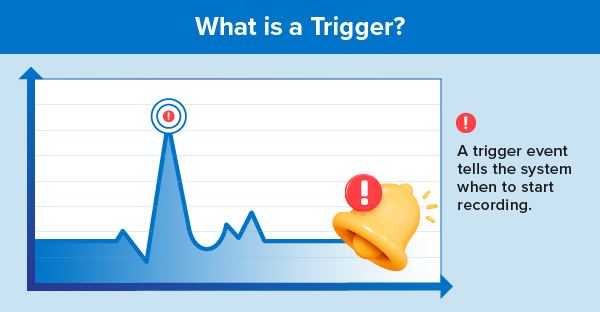
At its simplest, a trigger is a user-defined event—like a voltage spike or a manual button press—that tells your system to start recording. By using triggers, you can minimize the total amount of data you store, saving only the critical moments that matter for your test.
The “Time Machine” of Data: Circular Buffers
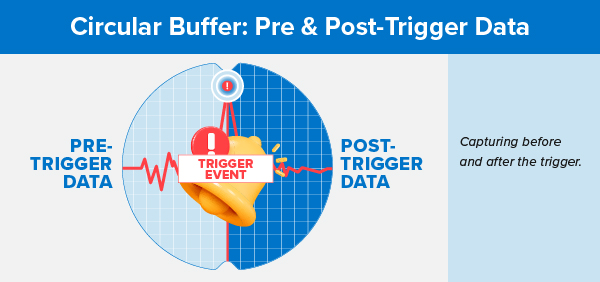
Historically, systems only recorded what happened after a trigger occurred. However, contemporary systems use a circular buffer—a First In First Out (FIFO) memory structure—to keep a rolling record of recent activity.
This allows you to capture:
- Pre-trigger data: What happened leading up to the event.
- Post-trigger data: What happened after the event.
You can typically program these buffers in 1% increments. For example, you could set your capture to include 50% pre-trigger and 50% post-trigger data to see the exact cause and effect of a signal failure.
Common Ways to Trigger Your Data
Depending on your application, you might use different “logic” to start or stop (abort) your recording:
| Trigger Type | How it Works | Best For... |
|---|---|---|
| Edge | Occurs when a signal moves above or below a specific level (rising or falling). | Detecting simple threshold crossings. |
| Window | Occurs when a signal moves inside or outside a defined "window" of values. | Monitoring signals that should stay within a safe range. |
| Slew | Occurs based on the signal's rate of change (slope). | Catching sudden spikes or unexpected dropouts. |
| Boolean | Uses AND/OR logic across multiple channels. | Complex scenarios where multiple conditions must be met. |
| Time/Periodic | Triggers at a specific date or after a set amount of elapsed time. | Unattended or repetitive testing. |
Visualizing the Window Trigger
You can set your system to ignore normal activity and only “wake up” when the signal leaves a specific zone.
Pro-Tip: Manual & External Triggers
Sometimes, you just need to initiate the trigger yourself.

- Manual Triggering: Use a softkey or hard key on your device to start a capture instantly.
- External Triggering: Use a TTL signal from another piece of hardware (via BNC or d-shell ports) to synchronize your data capture with other equipment in your lab.
Summary
Effective triggering turns a “data dump” into a “data insight.” By utilizing circular buffers for pre-trigger info and choosing the right trigger logic—like Slew or Window—you ensure that every byte of data you save is actually worth analyzing.